Ecommerce store management, media uploads, and public market research may all involve proxies, but they do not require the same network setup. A store dashboard usually benefits from a consistent exit IP. Regional page checks and public-data workflows may require broader location coverage and IP rotation.
Start with the task you need to complete. That decision makes it easier to choose the product type, location, bandwidth, and session settings.
Match the Proxy to the Ecommerce Task
| Task | Main requirement | Typical choice |
|---|---|---|
| Long-term store dashboard access | Consistent exit, matching region, stable connection | Static ISP proxy |
| Listings, inventory, and order management | Stable long sessions | Static ISP proxy |
| Product image or routine video uploads | Consistent exit and suitable bandwidth | Static ISP proxy |
| A small number of pages in one region | Consistent regional environment | Static or dynamic, based on duration |
| Products and prices across regions | Location coverage and flexible switching | Dynamic residential proxy |
| Public market-data collection | Rotation, concurrency, and traffic control | Dynamic residential proxy |
These are practical starting points rather than universal platform rules. Confirm the choice with your target market, workflow, and a small real-world test.
Long Term Store Management
Store logins, listing updates, inventory changes, and order handling usually involve repeated work in the same dashboard. A static ISP proxy provides a relatively consistent exit IP, reduces unnecessary network changes, and makes it easier to document which store uses which device, browser profile, and IP.
A fixed IP does not guarantee that a store will avoid verification or restrictions. Device changes, cookies, account history, payment details, operator behavior, and platform policies may also affect the account.
Regional Page Checks and Market Research
A dynamic residential proxy is often more flexible when a workflow needs to view public product pages, prices, inventory, or promotions across several regions. Per-request rotation suits tasks that require frequent IP changes. A sticky session keeps the same exit for a defined period and is useful when several related pages must be reviewed in sequence. Follow the target site’s terms, access limits, and applicable law.
Static ISP proxies vs dynamic residential proxies (Chinese guide)
Check Four Details Before Buying
Country and City
Choose a country that fits the store or market you need to work with. Before buying, confirm whether the target country is available, whether city-level selection is necessary, and which routes and inventory are currently shown. If a native IP is unavailable, do not assume that a nearby country is an equivalent replacement.
What to do when your target country has no native IP (Chinese guide)
Fixed or Rotating IP
Use a relatively fixed exit for long-term work in the same store. Consider rotation when you need to review public pages across multiple regions. Use a sticky session when one task must keep the same exit while several related pages are opened.
Bandwidth
Store dashboards, listing edits, and routine image uploads usually need a stable connection more than the highest available bandwidth. Test upload performance if the workflow includes large image batches or videos. Listed bandwidth is a maximum, not a constant measured speed. Local connectivity, the device, upstream or relay networks, and the destination server can all affect performance.
How to choose 5, 10, or 20 Mbps proxy bandwidth (Chinese guide)
HTTP or SOCKS5
Check which protocol your browser, anti-detect browser, or operating tool supports. HTTP works for common web-proxy tasks, while SOCKS5 generally supports a wider range of applications. KiloProxy supports HTTP and SOCKS5. If a configured proxy does not connect, also check the host, port, username, password, and upstream network.
Buy the Right Proxy in KiloProxy
Static ISP Proxy for Store Operations
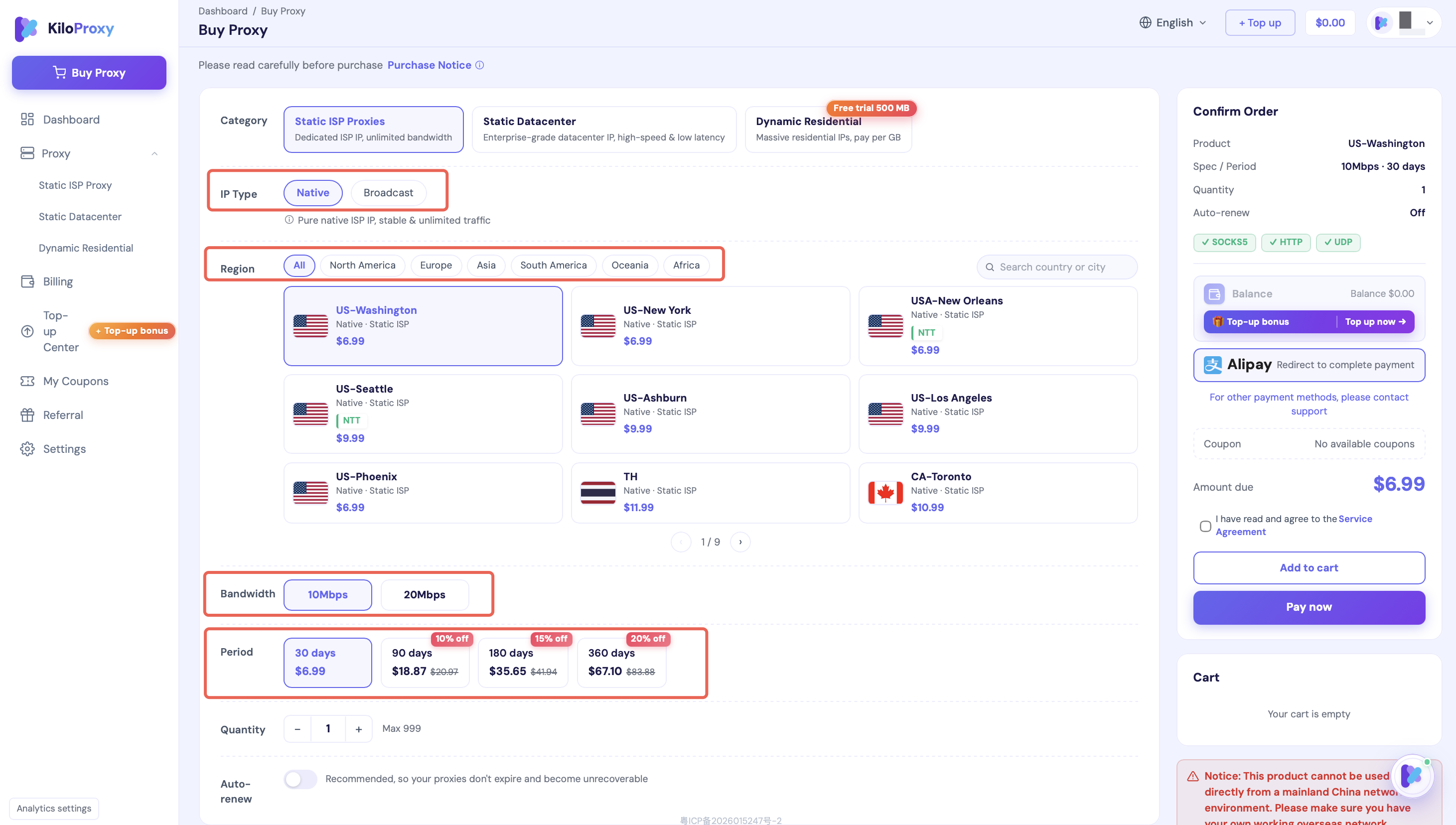
For ongoing store-dashboard work, use the following purchase flow:
Sign in to your KiloProxy account
Open the Static ISP Proxy purchase page
Choose the target country, city, and an available route
Select bandwidth based on dashboard and media-upload needs
Choose a service period and review the order
After purchase, copy the proxy host, port, username, and password
A KiloProxy Static ISP Proxy is dedicated during its active term. Available service periods include 30, 90, 180, and 360 days. Users may also enable automatic renewal in 30-day increments. Renewing on time allows the same IP to be retained. Check the current purchase page for available plans and discounts.
Dynamic Residential Proxy for Regional Research
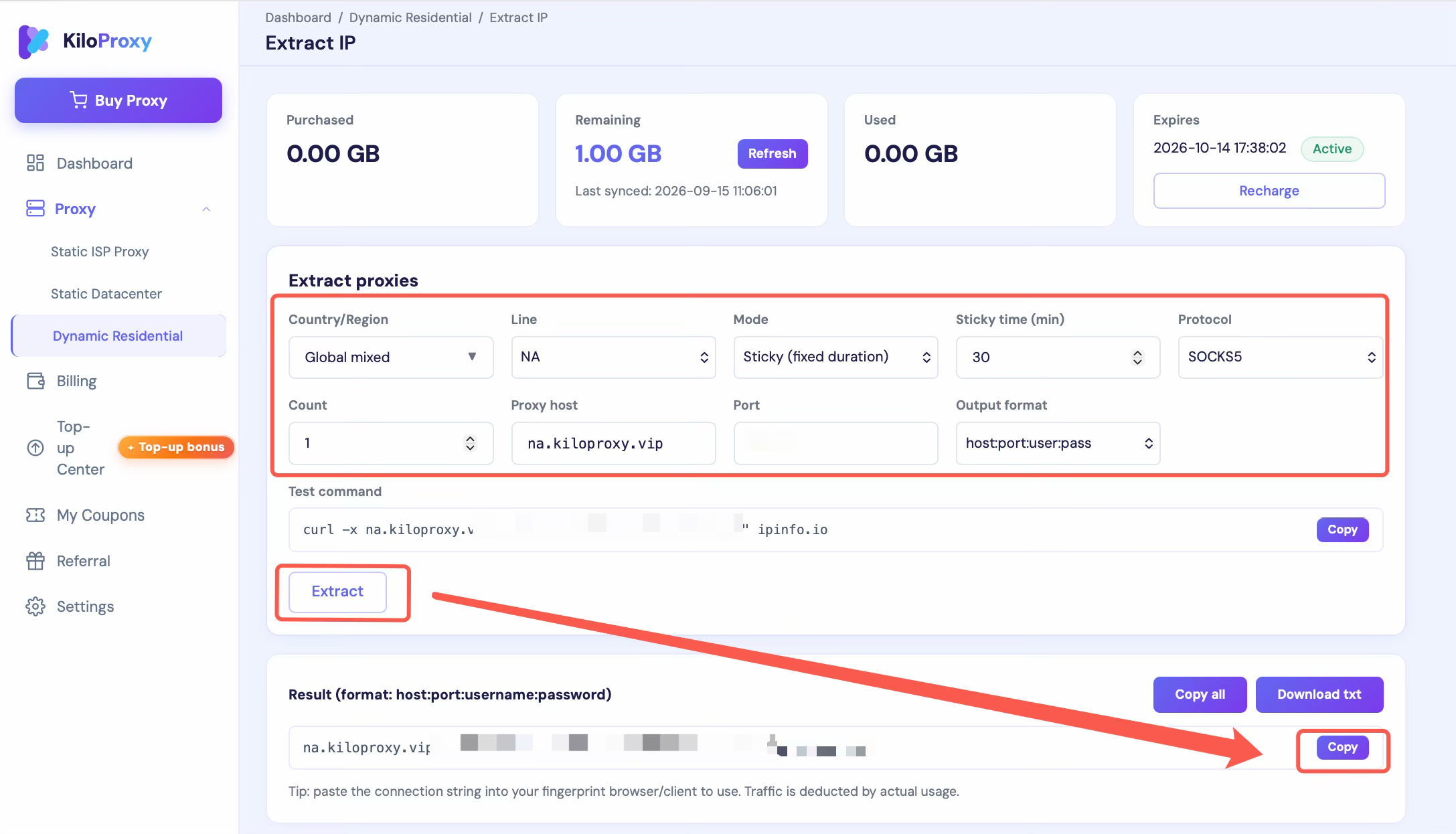
For multi-region public-page checks or market-data workflows, use the following setup:
Open the Dynamic Residential Proxy page and choose the required traffic
Select the target country or region
Choose per-request rotation or a sticky session
Set a sticky duration that fits the task
Choose HTTP or SOCKS5
Generate and copy the proxy credentials
KiloProxy Dynamic Residential Proxies support rotation on each request and sticky sessions from 10 to 120 minutes. Use per-request rotation when the task requires changing exits. Use a sticky session when related pages must be reviewed through the same exit for a limited period.
Run Three Checks Before Regular Use
Confirm the Proxy Is Active
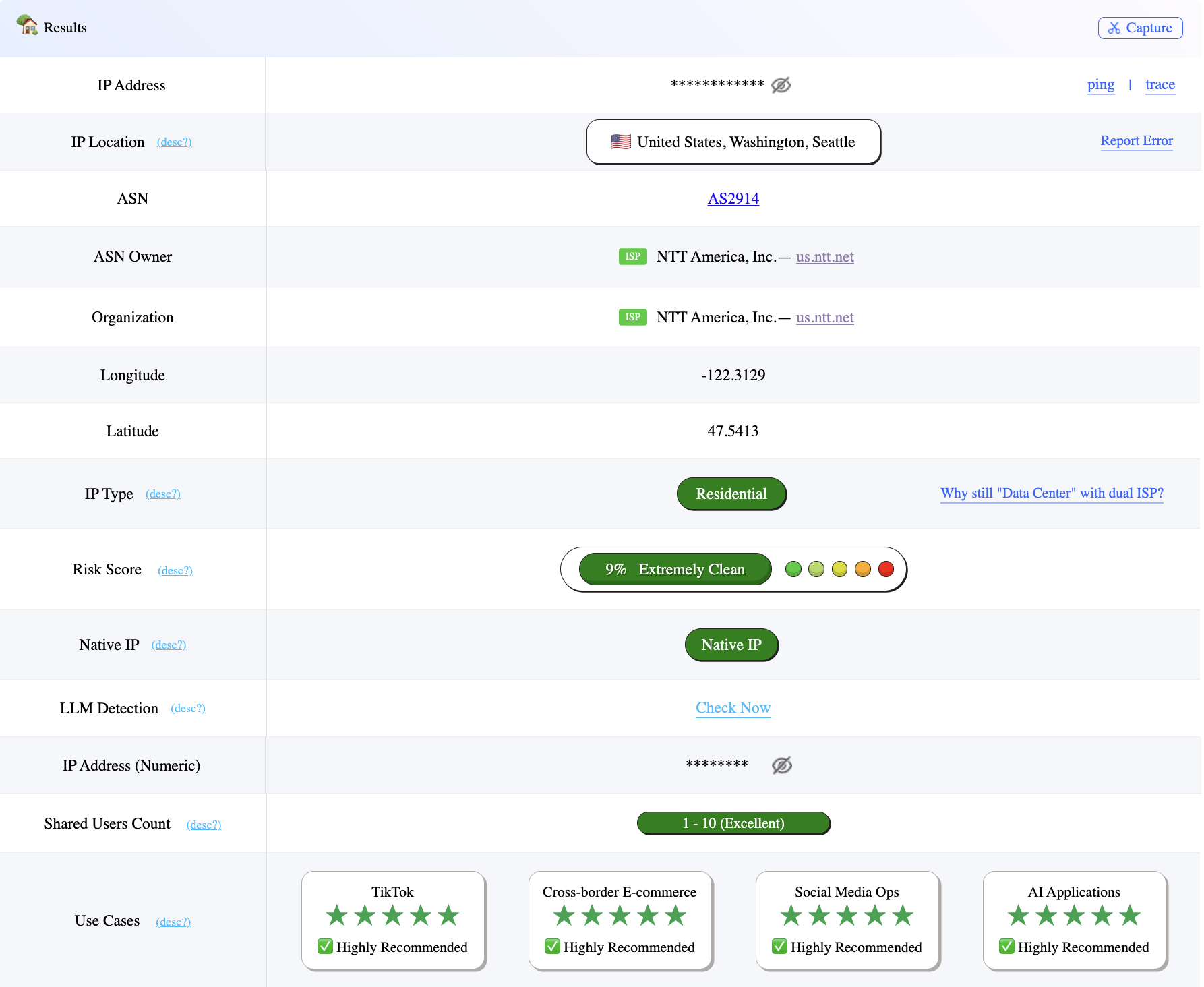
After configuration, open an IP-checking service and confirm that the current exit has changed to the purchased or generated proxy IP.
Confirm the Location
Check whether the detected country and city generally match your selection. Geolocation services use different databases, so their results may vary. Do not rely on one detector as universal ground truth.
Test the Real Ecommerce Workflow
Open the store dashboard and the pages used most often. Review listings and orders, then upload a normal product image. For market research, check whether regional pages and IP rotation behave as expected. A successful connection alone does not show that the proxy fits the workflow; the real task is the more useful test.
Quick Ecommerce Proxy Checklist
Long-term store access and management: choose a Static ISP Proxy
Products and prices across multiple regions: choose a Dynamic Residential Proxy
Routine dashboard work and image uploads: start with suitable base bandwidth and test
Frequent large image or video uploads: choose more bandwidth and test upload performance
Long-term store work: keep the country, device, and exit IP reasonably consistent
Market-data tasks: choose per-request rotation or a sticky session based on the workflow
Use product labels as inputs, then confirm the choice with a real business test
FAQ
Should an ecommerce store dashboard use a static or dynamic proxy
Can one IP be used for several stores
How much bandwidth is needed for product image uploads
Can a proxy be used as soon as it connects
Choose a Proxy for the Actual Ecommerce Task
Decide whether the main task is ongoing store management or multi-region market research, then choose a Static ISP Proxy or Dynamic Residential Proxy. KiloProxy lets users select available countries, cities, routes, bandwidth, rotation modes, and protocols. Current locations, routes, plans, and inventory should be confirmed on the purchase page.