When managing TikTok, Instagram, Facebook, or YouTube accounts, operators often ask the same practical questions:
- Can ten accounts use one IP address?
- Can multiple accounts on the same platform share an IP?
- Can accounts on different platforms use the same IP?
- Can the same account be used on both a phone and a computer?
- How can the environment remain consistent over time?
The answer depends less on the raw number of accounts and more on their relationship: platform, brand, client, project, and target market. Three rules provide a useful starting point:
- For independent accounts on the same platform, use one device, one account, and one IP wherever practical.
- Accounts on different platforms may share one fixed IP when they belong to the same brand, team, and target market.
- When the same account is used on a phone and a computer, both devices can keep the same IP environment.
A KiloProxy Static ISP Proxy can be configured on multiple devices, but those devices share the line bandwidth. Too many active devices, especially during image or video uploads, may reduce speed or cause fluctuations. A stable environment also depends on the device, browser profile, cookies, saved sessions, and operating routine.
Can Multiple Accounts on the Same Platform Use One IP?
Technically, they can. For long-term accounts that need to remain operationally separate, however, placing all of them behind one IP is not recommended.
If an agency manages ten TikTok accounts for different clients, brands, or projects, the preferred arrangement is one device, one account, and one IP. A “device” may also mean a dedicated, persistent browser profile when the workflow is browser-based.
Why separate independent accounts?
Independent accounts sharing one IP have the same network exit. Multiple active devices also share the available bandwidth. Separating environments reduces unnecessary overlap and makes it easier to identify the affected account, device, or IP when a login check or connection issue occurs.
This is an operational recommendation, not a universal platform rule, and it cannot guarantee that accounts will never be linked, challenged, or restricted. Devices, cookies, account details, behavior, and platform policies may also matter.
Do ten accounts require ten IPs?
Not always. The relationship among the accounts should guide the decision.
| Scenario | Recommended approach |
|---|---|
| Independent long-term accounts on one platform | Use one device, one account, and one IP where practical |
| Accounts for different clients or brands | Separate devices, profiles, and IPs |
| Accounts targeting different countries | Separate by target market |
| Related accounts under one legitimate organization | Evaluate the platform’s official permissions and workflow |
| One brand across different platforms | A fixed IP may be shared |
| The same account on a phone and computer | Keep the same IP environment |
| Multiple devices using one Static ISP Proxy | Allowed, but they share bandwidth |
Ten accounts do not always require ten IPs, but ten unrelated long-term accounts should not all share one. For a fixed and dedicated network exit, review the Static ISP Proxy product details.
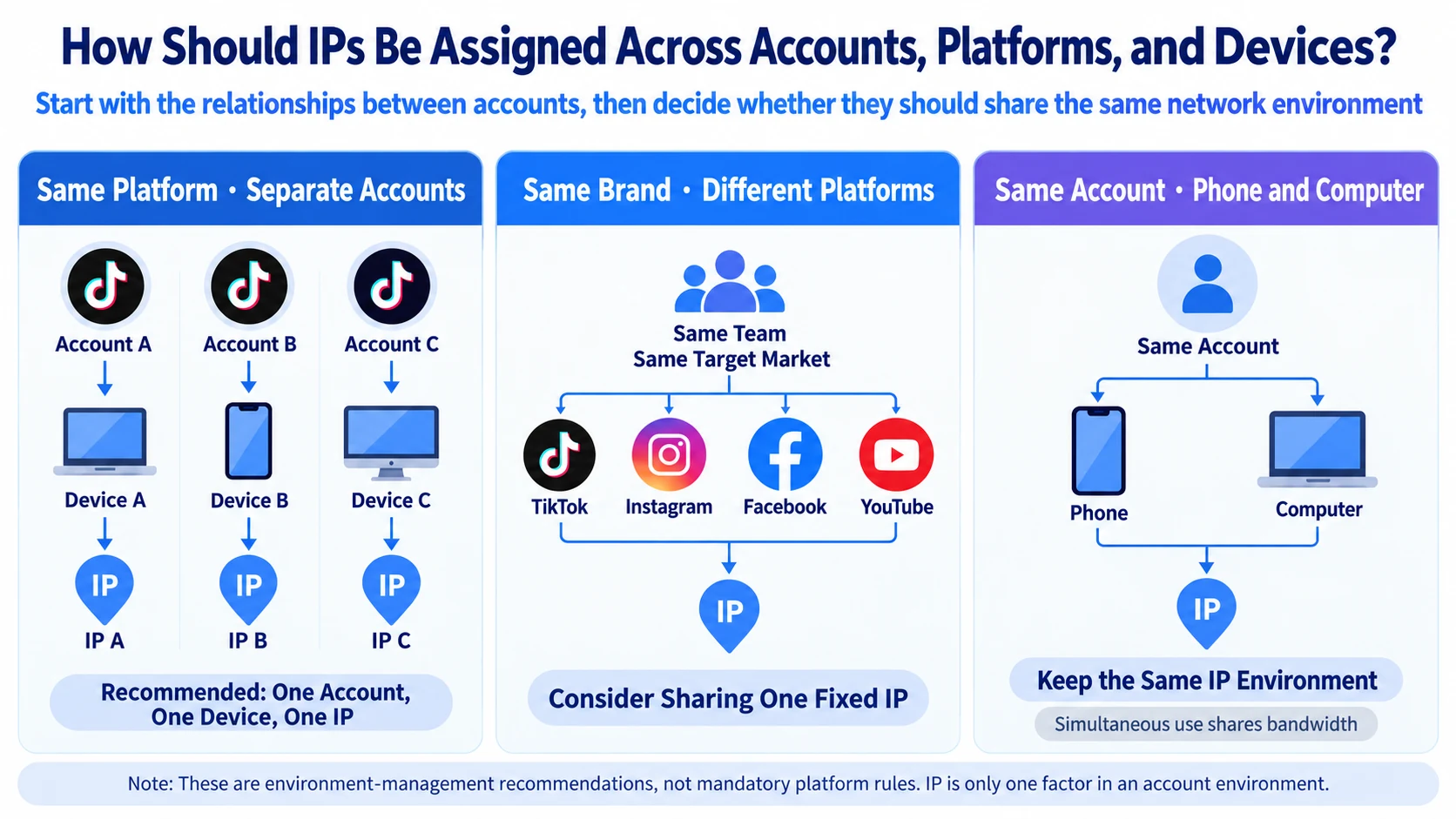
Can TikTok, Instagram, Facebook, and YouTube Share One IP?
They can when the accounts belong to the same brand, are managed by the same team, and target the same market. For example, a US brand may operate a TikTok account, Instagram profile, Facebook Page, and YouTube channel through the same fixed US IP. Their business identity and regional purpose are consistent, so separate IPs are not required merely because the platforms differ.
Separate environments are more appropriate when the accounts belong to different clients or brands, target different countries, or need independent operational ownership and troubleshooting.
A practical rule is: accounts for the same brand and market may share an IP across platforms; independent accounts on the same platform should use separate environments where practical.
An IP address alone does not determine account status or audience location. TikTok states that recommendations may consider interactions, content information, language, location, time zone, and device type in its explanation of how content is recommended.
Can the Same Account Be Used on a Phone and Computer?
Yes. When the same account is used in a mobile app and a desktop browser, both devices can keep the same fixed IP. For example, a TikTok operator may publish and reply on a phone while reviewing analytics or organizing assets on a computer.
- Use familiar devices consistently;
- Keep a consistent or operationally reasonable network region;
- Avoid frequent country changes over a short period;
- Enable two-step verification and review logged-in devices;
- If the proxy disconnects, pause account activity until the intended IP is restored.
TikTok recommends two-step verification and trusted-device management. Google also allows users to review recent phones, computers, browsers, and sessions connected to an account.
Will simultaneous use affect speed?
It can. A phone and computer using one Static ISP Proxy share the line bandwidth. Basic logins and browsing may have little visible impact, while simultaneous video uploads, downloads, or multiple dashboards may reduce available speed. Consider the bandwidth option, number of active devices, file sizes, local connection, and upstream network.
Why Use a Fixed IP for Long-Term Accounts?
Long-term account management benefits from continuity. Moving between a US IP, a UK IP, and an unproxied local connection adds changes that are harder for a team to document and troubleshoot.
- Reduce unnecessary network-exit changes;
- Document the device and IP assigned to each account;
- Separate clients, brands, and markets;
- Make team handovers clearer;
- Troubleshoot issues faster.
A fixed IP does not guarantee that an account will avoid login checks or restrictions. Device changes, cookies, saved sessions, account details, and behavior may also affect account access. Google notes that sign-ins on new devices can trigger verification, while Instagram provides recent-login review tools.
A Static ISP Proxy is generally a better fit for persistent account environments. Dynamic Residential Proxies are better evaluated for workflows that require many changing IPs.
How to Configure Separate Account Environments
Step 1: Map the accounts
- List the platforms and total number of accounts;
- Identify the brand or client behind each account;
- Record the target country;
- Choose the phone, computer, or browser profile;
- Mark whether the account is long-term.
Step 2: Decide what can share an environment
- Independent accounts on one platform: separate device or profile and IP where practical;
- One brand across several platforms: sharing may be reasonable;
- Different clients or brands: separate them;
- Different target countries: separate by market;
- The same account on phone and computer: keep the same IP.
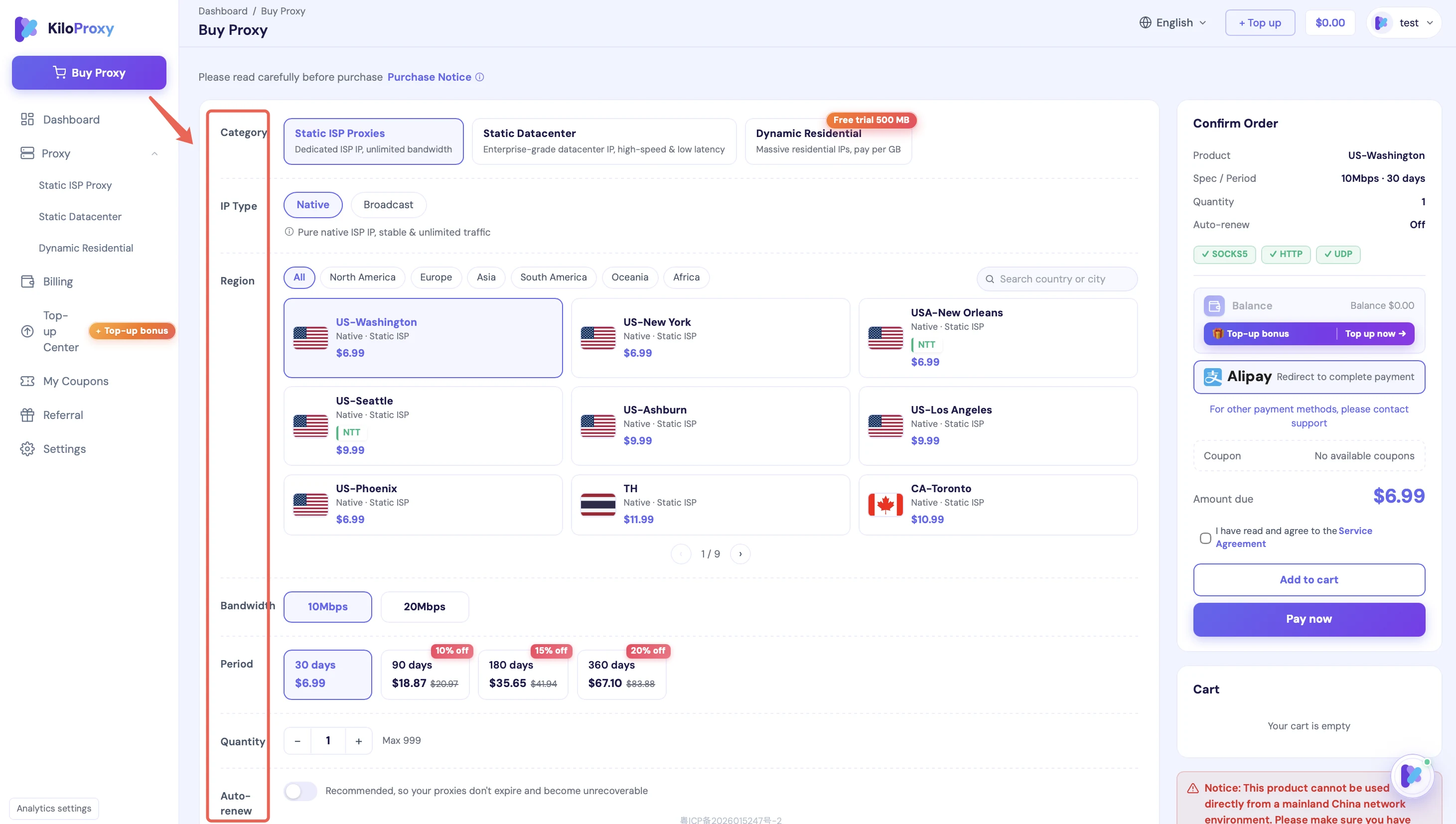
Step 3: Select a fixed IP and configure the device
For long-term social media operations, a fixed network exit is usually the priority. KiloProxy Static ISP Proxies are dedicated during the active service period. Users can select the country, city, route, and bandwidth, and retain the same IP with on-time renewal. Current availability should be confirmed on the product page.
Configure the proxy through supported mobile settings or a proxy application, or through a browser, anti-detect browser, or another proxy-compatible desktop application. Record the brand, platform, device, browser profile, internal proxy ID, owner, and renewal date. Do not store passwords or full proxy credentials in an ordinary tracking sheet.
Step 4: Verify the connection
- Confirm that the public exit IP is the intended proxy IP;
- Confirm the expected country and city;
- Open the target platform;
- Check that pages, images, and videos load or upload normally;
- Make sure account work does not continue unnoticed over the local connection after a proxy disconnect.
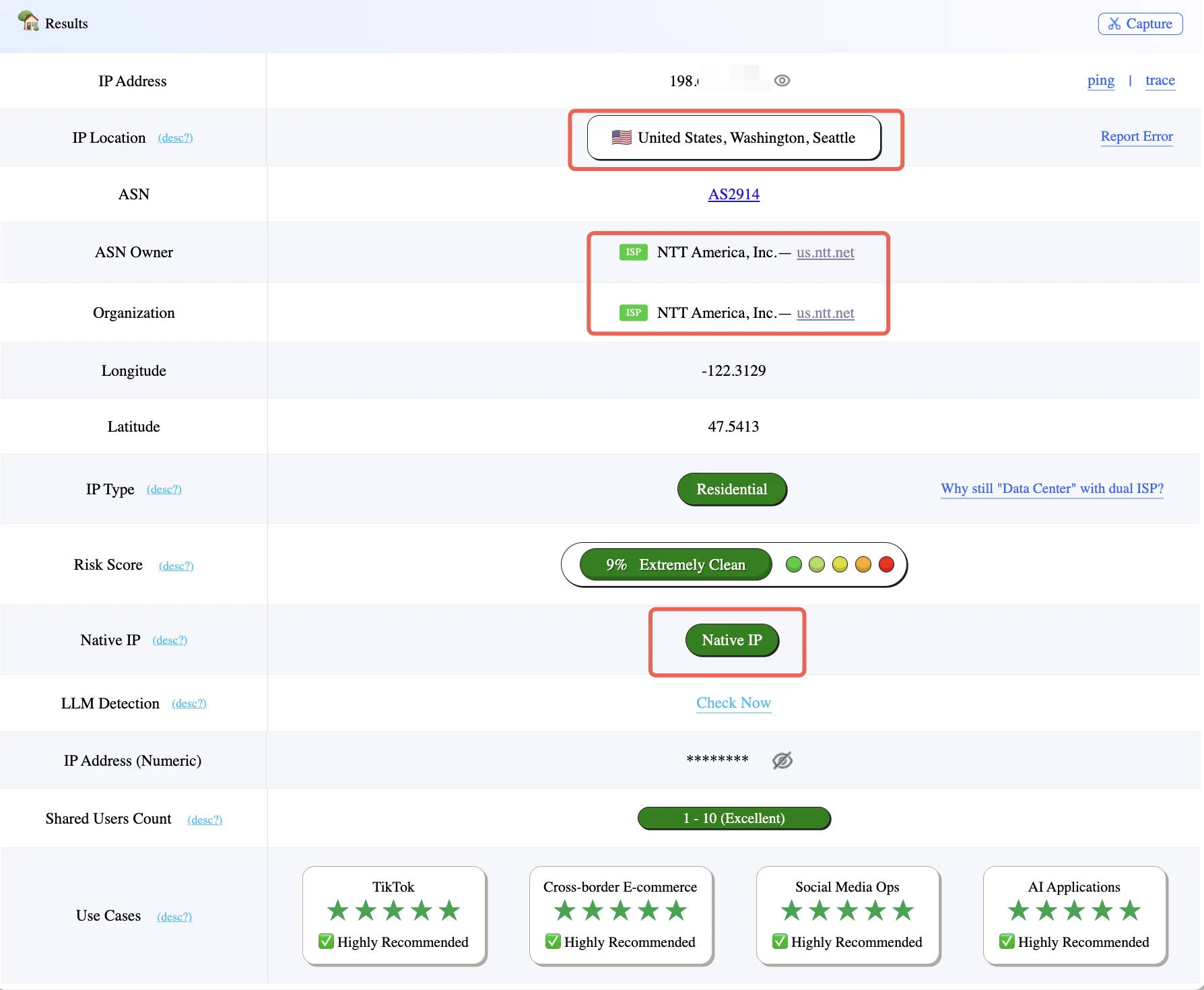
For a fuller exit and browser-environment check, follow the ToDetect proxy testing guide.
How to Keep the Environment Consistent
Check the exit IP before logging in
Confirm that the proxy is active before working on a long-term account.
Avoid frequent IP, device, and country changes
If the environment works, do not repeatedly replace it because of one slow result or minor fluctuation.
Keep normal cookies and saved sessions
Do not routinely clear cookies, use private windows, or rebuild browser profiles without a specific reason.
Do not swap environments across clients
Maintain a clear account-device-IP mapping during daily work and team handovers.
Limit heavy simultaneous use
Multiple devices may use one Static ISP Proxy, but they share bandwidth. Monitor speed when uploading video or other large assets.
Renew fixed IPs before expiry
KiloProxy supports optional 30-day auto-renewal and 30-, 90-, 180-, or 360-day plans. On-time renewal retains the same IP. Confirm current plans and discounts on the purchase page.
How to Troubleshoot an Account Issue
- Check whether the proxy is connected;
- Confirm the exit IP and country;
- Check whether the device or browser profile recently changed;
- Check whether cookies or saved sessions were removed;
- Review security alerts;
- Verify the password, email, phone number, and two-step verification;
- Review platform notices and account restrictions.
If the network works normally and only one account is affected, investigate the account itself instead of cycling through multiple IPs.
Final Takeaway: Allocate IPs by Account Relationship
- For independent accounts on the same platform, use one device, one account, and one IP where practical;
- Ten accounts do not always require ten IPs, but ten unrelated long-term accounts should not all share one;
- Accounts for the same brand and market may share a fixed IP across platforms;
- The same account can keep one IP across a phone and computer;
- Multiple devices using one Static ISP Proxy share its bandwidth;
- Long-term accounts can prioritize a fixed, dedicated Static ISP Proxy.
Separate IPs reduce unnecessary overlap and make client environments easier to manage, hand over, and troubleshoot. They do not guarantee that accounts will never be challenged, linked, or restricted.
FAQ
Can ten accounts on one platform use one IP?
Do ten accounts always require ten IPs?
Can accounts on different platforms share one IP?
Can the same account use one IP on a phone and computer?
Does one device, one account, and one IP prevent account linking?
Choose the network exit that fits the account relationship
Before configuring long-term social media accounts, map the platforms, account relationships, target markets, and devices. Then decide which environments can reasonably share an IP and which should remain separate.
KiloProxy provides fixed, dedicated Static ISP Proxies and rotating residential proxies for different workflows. Confirm current countries, cities, routes, bandwidth, and inventory on the product page.